
Baroclinic adjustment
In this example, we simulate the evolution and equilibration of a baroclinically unstable front.
Install dependencies
First let's make sure we have all required packages installed.
using Pkg
pkg"add Oceananigans, CairoMakie"using Oceananigans
using Oceananigans.Units
using Random
Random.seed!(8675309) # for reproducible resultsRandom.TaskLocalRNG()Grid
We use a three-dimensional channel that is periodic in the x direction:
Lx = 1000kilometers # east-west extent [m]
Ly = 1000kilometers # north-south extent [m]
Lz = 1kilometers    # depth [m]

grid = RectilinearGrid(size = (48, 48, 8),
                       x = (0, Lx),
                       y = (-Ly/2, Ly/2),
                       z = (-Lz, 0),
                       topology = (Periodic, Bounded, Bounded))
48×48×8 RectilinearGrid{Float64, Periodic, Bounded, Bounded} on CPU with 3×3×3 halo
├── Periodic x ∈ [0.0, 1.0e6) regularly spaced with Δx=20833.3
├── Bounded y ∈ [-500000.0, 500000.0] regularly spaced with Δy=20833.3
└── Bounded z ∈ [-1000.0, 0.0] regularly spaced with Δz=125.0Model
We build a HydrostaticFreeSurfaceModel on a beta-plane centered at 45° South.
model = HydrostaticFreeSurfaceModel(grid;
                                    coriolis = BetaPlane(latitude = -45),
                                    buoyancy = BuoyancyTracer(),
                                    tracers = :b,
                                    momentum_advection = WENO(),
                                    tracer_advection = WENO())
HydrostaticFreeSurfaceModel{CPU, RectilinearGrid}(time = 0 seconds, iteration = 0)
├── grid: 48×48×8 RectilinearGrid{Float64, Periodic, Bounded, Bounded} on CPU with 3×3×3 halo
├── timestepper: QuasiAdamsBashforth2TimeStepper
├── tracers: b
├── closure: Nothing
├── buoyancy: BuoyancyTracer with ĝ = NegativeZDirection()
├── free surface: ImplicitFreeSurface with gravitational acceleration 9.80665 m s⁻²
│ └── solver: FFTImplicitFreeSurfaceSolver
├── advection scheme:
│ ├── momentum: WENO{3, Float64, Oceananigans.Utils.BackendOptimizedDivision}(order=5)
│ └── b: WENO{3, Float64, Oceananigans.Utils.BackendOptimizedDivision}(order=5)
├── vertical_coordinate: ZCoordinate
└── coriolis: BetaPlane{Oceananigans.Advection.EnstrophyConserving{Float64}, Float64}We start our simulation from rest with a baroclinically unstable buoyancy distribution. We use ramp(y, Δy), defined below, to specify a front with width Δy and horizontal buoyancy gradient M². We impose the front on top of a vertical buoyancy gradient N² and a bit of noise.
"""
    ramp(y, Δy)

Linear ramp from 0 to 1 between -Δy/2 and +Δy/2:

            y < -Δy/2 => ramp = 0
    -Δy/2 < y < +Δy/2 => ramp = y / Δy + 1/2
            y > +Δy/2 => ramp = 1
"""
ramp(y, Δy) = clamp(y / Δy + 1/2, 0, 1)

N² = 1e-5 # [s⁻²] buoyancy frequency / stratification
M² = 1e-7 # [s⁻²] horizontal buoyancy gradient

Δy = 100kilometers # width of the region of the front
Δb = Δy * M²       # buoyancy jump associated with the front
ϵb = 1e-2 * Δb     # noise amplitude

bᵢ(x, y, z) = N² * z + Δb * ramp(y, Δy) + ϵb * randn()

set!(model, b=bᵢ)
Let's visualize the initial buoyancy distribution.
using CairoMakie
set_theme!(Theme(fontsize = 20))

# Horizontal coordinates in kilometers
x = xnodes(grid, Center()) / kilometer
y = ynodes(grid, Center()) / kilometer
z = znodes(grid, Center())

b = model.tracers.b

fig, ax, hm = heatmap(y, z, view(b, 1, :, :),
                      colormap = :deep,
                      axis = (xlabel = "y (km)",
                              ylabel = "z (m)",
                              title = "b(x=0, y, z, t=0)",
                              titlesize = 24))

Colorbar(fig[1, 2], hm, label = "m s⁻²")

fig
Simulation
Now let's build a Simulation.
simulation = Simulation(model, Δt=20minutes, stop_time=20days)Simulation of HydrostaticFreeSurfaceModel{CPU, RectilinearGrid}(time = 0 seconds, iteration = 0)
├── Next time step: 20 minutes
├── run_wall_time: 0 seconds
├── run_wall_time / iteration: NaN days
├── stop_time: 20 days
├── stop_iteration: Inf
├── wall_time_limit: Inf
├── minimum_relative_step: 0.0
├── callbacks: OrderedDict with 4 entries:
│ ├── stop_time_exceeded => Callback of stop_time_exceeded on IterationInterval(1)
│ ├── stop_iteration_exceeded => Callback of stop_iteration_exceeded on IterationInterval(1)
│ ├── wall_time_limit_exceeded => Callback of wall_time_limit_exceeded on IterationInterval(1)
│ └── nan_checker => Callback of NaNChecker for u on IterationInterval(100)
└── output_writers: OrderedDict with no entriesWe add a TimeStepWizard callback to adapt the simulation's time-step,
conjure_time_step_wizard!(simulation, IterationInterval(20), cfl=0.2, max_Δt=20minutes)Also, we add a callback to print a message about how the simulation is going,
using Printf

function print_progress(sim)
    u, v, w = sim.model.velocities
    progress = 100 * time(sim) / sim.stop_time

    @printf("[%05.2f%%] i: %d, t: %s, wall time: %s, max(u): (%6.3e, %6.3e, %6.3e) m s⁻¹, next Δt: %s\n",
            progress, iteration(sim), prettytime(sim), prettytime(sim.run_wall_time),
            maximum(abs, u), maximum(abs, v), maximum(abs, w), prettytime(sim.Δt))

    return nothing
end

add_callback!(simulation, print_progress, IterationInterval(100))
Diagnostics/Output
Here, we save the buoyancy
u, v, w = model.velocities
ζ = ∂x(v) - ∂y(u)
B = Average(b, dims=1)
U = Average(u, dims=1)
V = Average(v, dims=1)

filename = "baroclinic_adjustment"
save_fields_interval = 0.5day

slicers = (east = (grid.Nx, :, :),
           north = (:, grid.Ny, :),
           bottom = (:, :, 1),
           top = (:, :, grid.Nz))

for (side, indices) in pairs(slicers)
    simulation.output_writers[side] = JLD2Writer(model, (; b, ζ);
                                                 filename = filename * "_$(side)_slice",
                                                 schedule = TimeInterval(save_fields_interval),
                                                 overwrite_files = true,
                                                 indices)
end

simulation.output_writers[:zonal] = JLD2Writer(model, (; b=B, u=U, v=V);
                                               filename = filename * "_zonal_average",
                                               schedule = TimeInterval(save_fields_interval),
                                               overwrite_files = true)
JLD2Writer scheduled on TimeInterval(12 hours):
├── filepath: baroclinic_adjustment_zonal_average.jld2
├── 3 outputs: (b, u, v)
├── array_type: Array{Float32}
├── including: [:coriolis, :buoyancy, :closure]
├── file_splitting: NoFileSplitting
└── file size: 0 bytes (file not yet created)Now we're ready to run.
@info "Running the simulation..."

run!(simulation)

@info "Simulation completed in " * prettytime(simulation.run_wall_time)
[ Info: Running the simulation...
[ Info: Initializing simulation...
[00.00%] i: 0, t: 0 seconds, wall time: 0 seconds, max(u): (0.000e+00, 0.000e+00, 0.000e+00) m s⁻¹, next Δt: 20 minutes
[ Info: ... simulation initialization complete (16.598 seconds)
[ Info: Executing initial time step...
[ Info: ... initial time step complete (1.729 seconds).
[06.94%] i: 100, t: 1.389 days, wall time: 18.472 seconds, max(u): (1.202e-01, 1.312e-01, 1.767e-03) m s⁻¹, next Δt: 20 minutes
[13.89%] i: 200, t: 2.778 days, wall time: 18.629 seconds, max(u): (2.107e-01, 1.997e-01, 2.027e-03) m s⁻¹, next Δt: 20 minutes
[20.83%] i: 300, t: 4.167 days, wall time: 18.785 seconds, max(u): (2.946e-01, 2.550e-01, 1.878e-03) m s⁻¹, next Δt: 20 minutes
[27.78%] i: 400, t: 5.556 days, wall time: 18.953 seconds, max(u): (3.763e-01, 3.789e-01, 1.965e-03) m s⁻¹, next Δt: 20 minutes
[34.72%] i: 500, t: 6.944 days, wall time: 19.101 seconds, max(u): (5.027e-01, 6.275e-01, 2.509e-03) m s⁻¹, next Δt: 20 minutes
[41.67%] i: 600, t: 8.333 days, wall time: 19.296 seconds, max(u): (6.246e-01, 1.002e+00, 3.333e-03) m s⁻¹, next Δt: 20 minutes
[48.61%] i: 700, t: 9.722 days, wall time: 19.466 seconds, max(u): (1.013e+00, 1.214e+00, 5.295e-03) m s⁻¹, next Δt: 20 minutes
[55.56%] i: 800, t: 11.111 days, wall time: 19.629 seconds, max(u): (1.227e+00, 1.333e+00, 5.421e-03) m s⁻¹, next Δt: 20 minutes
[62.50%] i: 900, t: 12.500 days, wall time: 19.820 seconds, max(u): (1.478e+00, 1.269e+00, 4.107e-03) m s⁻¹, next Δt: 20 minutes
[69.44%] i: 1000, t: 13.889 days, wall time: 19.991 seconds, max(u): (1.459e+00, 1.215e+00, 4.292e-03) m s⁻¹, next Δt: 20 minutes
[76.39%] i: 1100, t: 15.278 days, wall time: 20.152 seconds, max(u): (1.449e+00, 1.189e+00, 4.518e-03) m s⁻¹, next Δt: 20 minutes
[83.33%] i: 1200, t: 16.667 days, wall time: 20.342 seconds, max(u): (1.413e+00, 1.146e+00, 3.176e-03) m s⁻¹, next Δt: 20 minutes
[90.28%] i: 1300, t: 18.056 days, wall time: 20.511 seconds, max(u): (1.332e+00, 1.009e+00, 2.964e-03) m s⁻¹, next Δt: 20 minutes
[97.22%] i: 1400, t: 19.444 days, wall time: 20.653 seconds, max(u): (1.329e+00, 1.255e+00, 3.040e-03) m s⁻¹, next Δt: 20 minutes
[ Info: Simulation is stopping after running for 20.724 seconds.
[ Info: Simulation time 20 days equals or exceeds stop time 20 days.
[ Info: Simulation completed in 20.745 secondsVisualization
All that's left is to make a pretty movie. Actually, we make two visualizations here. First, we illustrate how to make a 3D visualization with Makie's Axis3 and Makie.surface. Then we make a movie in 2D. We use CairoMakie in this example, but note that using GLMakie is more convenient on a system with OpenGL, as figures will be displayed on the screen.
Three-dimensional visualization
We load the saved buoyancy output on the top, north, and east surfaces as FieldTimeSerieses.
slice_filenames = NamedTuple(side => filename * "_$(side)_slice.jld2" for side in keys(slicers))
zonal_average_filename = filename * "_zonal_average.jld2"

b_timeserieses = (east  = FieldTimeSeries(slice_filenames.east, "b"),
                  north = FieldTimeSeries(slice_filenames.north, "b"),
                  top   = FieldTimeSeries(slice_filenames.top, "b"))

B_timeseries = FieldTimeSeries(zonal_average_filename, "b")

times = B_timeseries.times
To draw the domain's surfaces with surface! we need the coordinates of each surface as matrices, using the coordinates x, y (in kilometers), and z (in meters) that we built above.
Nx, Ny, Nz = size(grid)

x_xz = repeat(x, 1, Nz)
y_xz_north = fill(y[end], Nx, Nz)
z_xz = repeat(z', Nx, 1)

x_yz_east = fill(x[end], Ny, Nz)
y_yz = repeat(y, 1, Nz)
z_yz = repeat(z', Ny, 1)

z_xy_top = fill(z[end], Nx, Ny)
Then we create a 3D axis. We use zonal_slice_displacement to control where the plot of the instantaneous zonal average flow is located.
fig = Figure(size = (1600, 800))

zonal_slice_displacement = 1.2

ax = Axis3(fig[2, 1],
           aspect=(1, 1, 1/5),
           xlabel = "x (km)", ylabel = "y (km)", zlabel = "z (m)",
           xlabeloffset = 100, ylabeloffset = 100, zlabeloffset = 100,
           limits = ((x[1], zonal_slice_displacement * x[end]), (y[1], y[end]), (z[1], z[end])),
           elevation = 0.45, azimuth = 6.8,
           xspinesvisible = false, zgridvisible = false,
           protrusions = 40, perspectiveness = 0.7)
Axis3 with 0 plots:We use data from the final savepoint for the 3D plot. Note that this plot can easily be animated by using Makie's Observable. To dive into Observables, check out Makie.jl's Documentation.
n = length(times)41Now let's make a 3D plot of the buoyancy and in front of it we'll use the zonally-averaged output to plot the instantaneous zonal-average of the buoyancy.
b_slices = (east  = interior(b_timeserieses.east[n], 1, :, :),
            north = interior(b_timeserieses.north[n], :, 1, :),
            top   = interior(b_timeserieses.top[n], :, :, 1))

B = interior(B_timeseries[n], 1, :, :)

clims = 1.1 .* extrema(b_slices.top)

kwargs = (colorrange=clims, colormap=:deep, shading=NoShading)

surface!(ax, x_yz_east, y_yz, z_yz;  color = b_slices.east, kwargs...)
surface!(ax, x_xz, y_xz_north, z_xz; color = b_slices.north, kwargs...)
surface!(ax, x, y, z_xy_top;         color = b_slices.top, kwargs...)

sf = surface!(ax, zonal_slice_displacement .* x_yz_east, y_yz, z_yz; color = B, kwargs...)

contour!(ax, y, z, B; transformation = (:yz, zonal_slice_displacement * x[end]),
         levels = 15, linewidth = 2, color = :black)

Colorbar(fig[2, 2], sf, label = "m s⁻²", height = Relative(0.4), tellheight=false)

title = "Buoyancy at t = " * prettytime(times[n])
fig[1, 1:2] = Label(fig, title; fontsize = 24, tellwidth = false, padding = (0, 0, -120, 0))

rowgap!(fig.layout, 1, Relative(-0.2))
colgap!(fig.layout, 1, Relative(-0.1))

save("baroclinic_adjustment_3d.png", fig)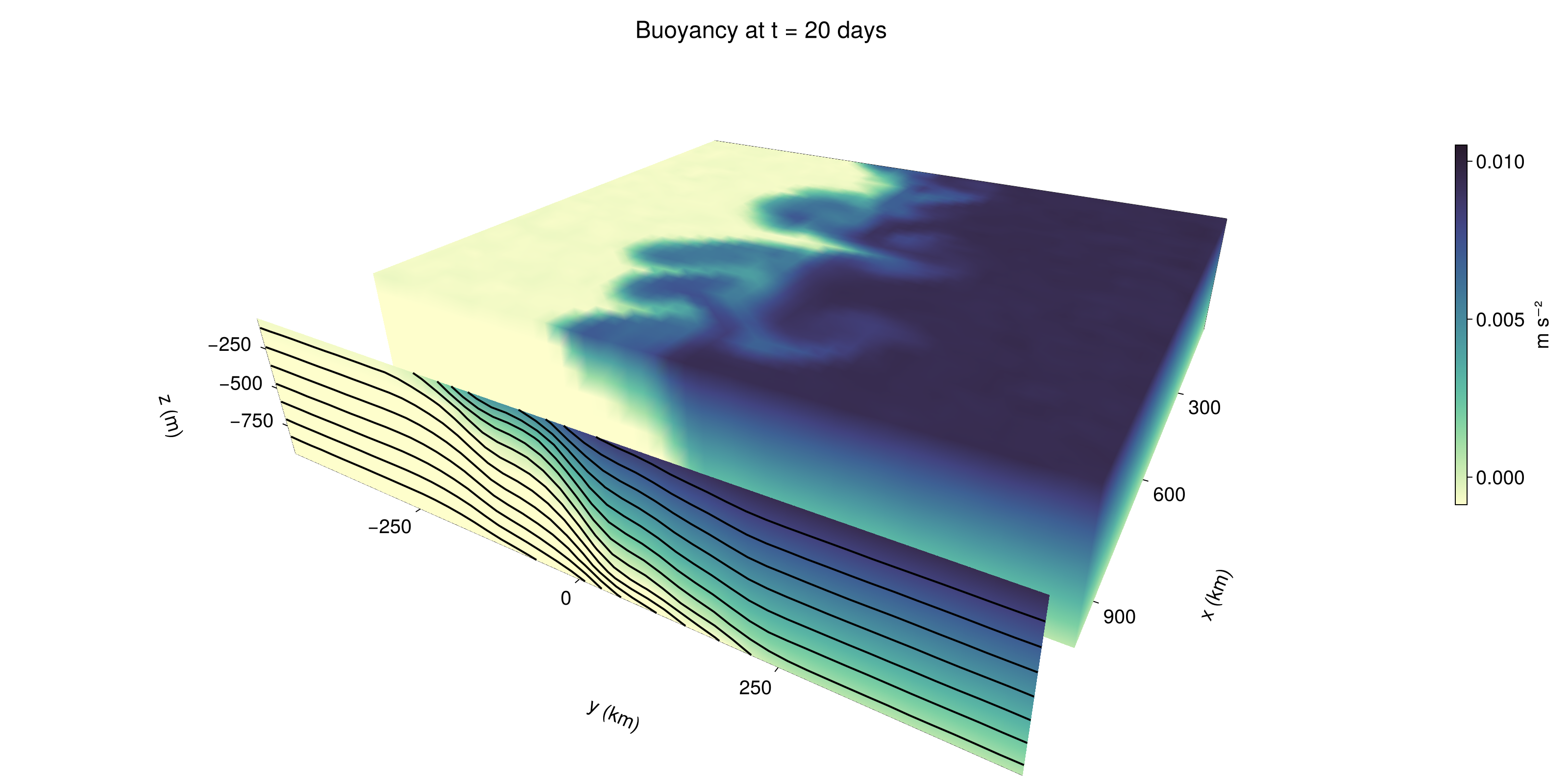
Two-dimensional movie
We make a 2D movie that shows buoyancy FieldTimeSeries and build the coordinates of the nodes where
ζ_timeseries = FieldTimeSeries(slice_filenames.top, "ζ")
U_timeseries = FieldTimeSeries(zonal_average_filename, "u")
V_timeseries = FieldTimeSeries(zonal_average_filename, "v")

xᶠ = xnodes(grid, Face()) / kilometer
yᶠ = ynodes(grid, Face()) / kilometer-500.0:20.833333333333332:500.0Next, we set up a plot with 4 panels. The top panels are large and square, while the bottom panels get a reduced aspect ratio through rowsize!.
fig = Figure(size=(1800, 1000))

axb = Axis(fig[1, 2], xlabel="x (km)", ylabel="y (km)", aspect=1)
axζ = Axis(fig[1, 3], xlabel="x (km)", ylabel="y (km)", aspect=1, yaxisposition=:right)

axu = Axis(fig[2, 2], xlabel="y (km)", ylabel="z (m)")
axv = Axis(fig[2, 3], xlabel="y (km)", ylabel="z (m)", yaxisposition=:right)

rowsize!(fig.layout, 2, Relative(0.3))
To prepare a plot for animation, we index the timeseries with an Observable,
n = Observable(1)

bₙ = @lift b_timeserieses.top[$n]
ζₙ = @lift ζ_timeseries[$n]
Uₙ = @lift U_timeseries[$n]
Vₙ = @lift V_timeseries[$n]
Bₙ = @lift B_timeseries[$n]
Observable(1×48×8 Field{Nothing, Center, Center} reduced over dims = (1,) on RectilinearGrid on CPU
├── grid: 48×48×8 RectilinearGrid{Float64, Periodic, Bounded, Bounded} on CPU with 3×3×3 halo
├── boundary conditions: FieldBoundaryConditions
│ └── west: Nothing, east: Nothing, south: ZeroFlux, north: ZeroFlux, bottom: ZeroFlux, top: ZeroFlux, immersed: Nothing
└── data: 1×54×14 OffsetArray(view(::Array{Float64, 4}, :, :, :, 1), 1:1, -2:51, -2:11) with eltype Float64 with indices 1:1×-2:51×-2:11
└── max=0.00940253, min=-0.00942126, mean=-6.65662e-8)and then build our plot:
hm = heatmap!(axb, x, y, bₙ, colorrange=(0, Δb), colormap=:thermal)
Colorbar(fig[1, 1], hm, flipaxis=false, label="Surface b(x, y) (m s⁻²)")

hm = heatmap!(axζ, xᶠ, yᶠ, ζₙ, colorrange=(-5e-5, 5e-5), colormap=:balance)
Colorbar(fig[1, 4], hm, label="Surface ζ(x, y) (s⁻¹)")

hm = heatmap!(axu, y, z, Uₙ; colorrange=(-5e-1, 5e-1), colormap=:balance)
Colorbar(fig[2, 1], hm, flipaxis=false, label="Zonally-averaged U(y, z) (m s⁻¹)")
contour!(axu, y, z, Bₙ; levels=15, color=:black)

hm = heatmap!(axv, yᶠ, z, Vₙ; colorrange=(-1e-1, 1e-1), colormap=:balance)
Colorbar(fig[2, 4], hm, label="Zonally-averaged V(y, z) (m s⁻¹)")
contour!(axv, y, z, Bₙ; levels=15, color=:black)
Finally, we're ready to record the movie.
frames = 1:length(times)

record(fig, filename * ".mp4", frames, framerate=8) do i
    n[] = i
end
Julia version and environment information
This example was executed with the following version of Julia:
using InteractiveUtils: versioninfo
versioninfo()
Julia Version 1.13.2
Commit 45b6d15e34b (2026-10-14 20:33 UTC)
Build Info:
Official https://julialang.org release
Platform Info:
OS: Linux (x86_64-linux-gnu)
CPU: 128 × AMD EPYC 9374F 32-Core Processor
WORD_SIZE: 64
LLVM: libLLVM-20.1.8 (ORCJIT, znver4)
GC: Built with stock GC
Threads: 1 default, 1 interactive, 1 GC (on 128 virtual cores)
Environment:
JULIA_LOAD_PATH = @:@v#.#:@stdlib
JULIA_DEPOT_PATH = /var/lib/buildkite-agent/.julia:/var/lib/buildkite-agent/.julia/juliaup/julia-1.13.2+0.x64.linux.gnu/local/share/julia:/var/lib/buildkite-agent/.julia/juliaup/julia-1.13.2+0.x64.linux.gnu/share/julia
JULIA_VERSION_ENZYME = 1.13.1
JULIA_PKG_SERVER_REGISTRY_PREFERENCE = eager
LD_LIBRARY_PATH =
JULIA_MAX_NUM_PRECOMPILE_FILES = 24
JULIA_VERSION = 1.13.2
JULIA_CUDA_USE_COMPAT = false
JULIA_PROJECT = /var/lib/buildkite-agent/Oceananigans.jl-35332/docs/
JULIA_DEBUG = LiterateThese were the top-level packages installed in the environment:
import Pkg
Pkg.status()
Status `~/Oceananigans.jl-35332/docs/Project.toml`
[79e6a3ab] Adapt v4.7.4
⌃ [052768ef] CUDA v6.2.2
[13f3f980] CairoMakie v0.15.16
[8e50ac2c] ConservativeRegridding v0.2.17
⌅ [e30172f5] Documenter v1.17.0
[daee34ce] DocumenterCitations v1.5.0
⌃ [4710194d] DocumenterVitepress v0.3.8
[7da242da] Enzyme v0.13.216
[033835bb] JLD2 v0.6.7
⌅ [63c18a36] KernelAbstractions v0.9.45
[98b081ad] Literate v2.21.0
[da04e1cc] MPI v0.20.29
[85f8d34a] NCDatasets v0.14.15
[9e8cae18] Oceananigans v0.115.0 `..`
[429524aa] Optim v2.3.2
[f27b6e38] Polynomials v4.1.4
⌅ [3c362404] Reactant v0.2.292
[6038ab10] Rotations v1.7.1
[d496a93d] SeawaterPolynomials v0.3.11
[09ab397b] StructArrays v0.7.4
[bdfc003b] TimesDates v0.3.3
[0a941bbe] Zarr v0.11.2
[b77e0a4c] InteractiveUtils v1.11.0
[37e2e46d] LinearAlgebra v1.13.0
[44cfe95a] Pkg v1.13.0
Info Packages marked with ⌃ and ⌅ have new versions available. Those with ⌃ may be upgradable, but those with ⌅ are restricted by compatibility constraints from upgrading. To see why use `status --outdated`This page was generated using Literate.jl.